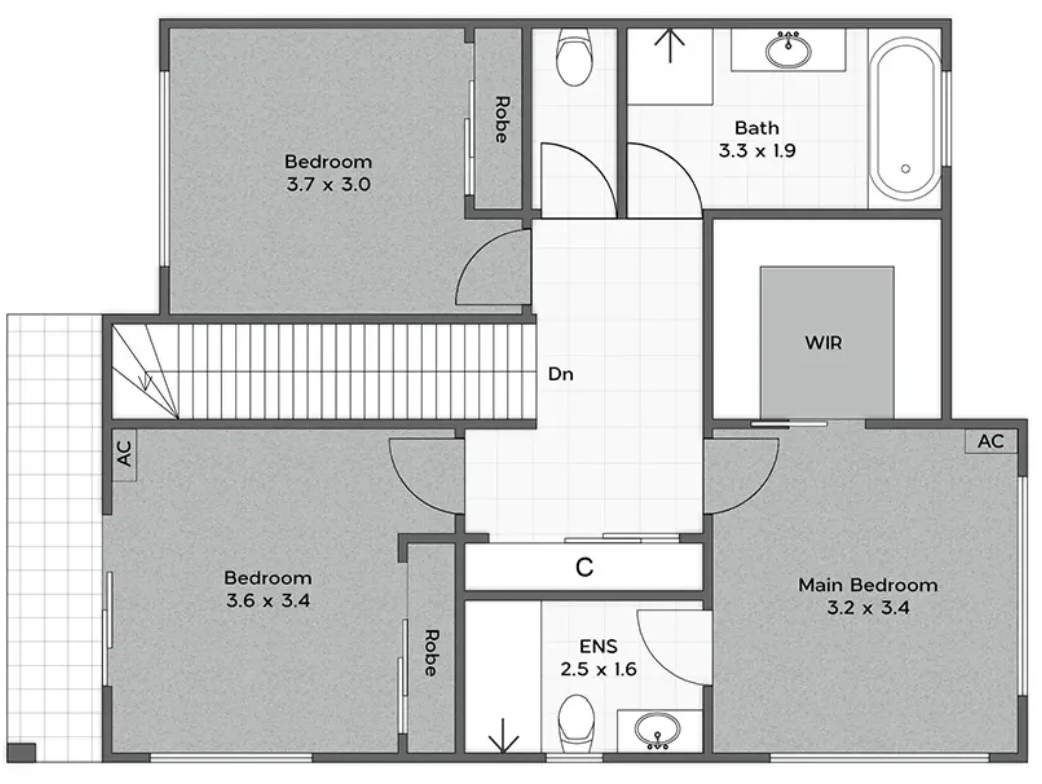
When DWG output is the right choice
Best for
- Documentation workflows that require editable files
- Teams maintaining internal CAD libraries or downstream design packs
- Builders, designers and technical teams working under time pressure
- Standardizing deliverables across portfolios and recurring volume
What we deliver (DWG package)
Depending on your standards and scope, the DWG package may include:
- Clean floor plan linework (template-aligned)
- Basic symbols (doors, windows, stairs) consistent across the set
- Labels and room naming applied per your rules
- Multi-level sets where required
Export pack
- PDF / PNG / JPG exports matching the DWG set
- Batch folder structure and naming conventions
Inputs (what to send)
We can produce DWG deliverables from:
- Measurement sheets / structured survey notes
- Sketches + markups
- PDFs/scans of existing plans
- Existing CAD files (if available)
- Your CAD standard or template reference (preferred)
If you have a CAD standard
Share any of the following to speed alignment:
- Layer naming conventions
- Lineweight/plot style preferences
- Title block requirements (if used)
- Unit/scale conventions
Clean-file approach (what “CAD-ready” means here)
To keep DWG output usable across teams and batches, we focus on:
- Consistent structure aligned to your template/SOP
- Clear organization suitable for downstream edits
- Predictable exports and batch delivery rules
(If you need strict layering rules, we align on them at intake and apply consistently.)
Standards
BBMI / NEN 2580 supported (when required).
Samples